Free · on the Chrome Web Store
Your AI accountant,
on top of the tools you already use.
Open Finn beside Xero, QuickBooks, FreeAgent, Sage, or a bank statement, an invoice, a spreadsheet. Tap a button and Finn reads the screen and tells you what stands out, with cited sources.
Chrome · reads only the screenshot you send · read-only · a few free questions, then log in
The Pret lunch is client entertaining, so it is not deductible for Corporation Tax and the VAT cannot be reclaimed.
See it in action
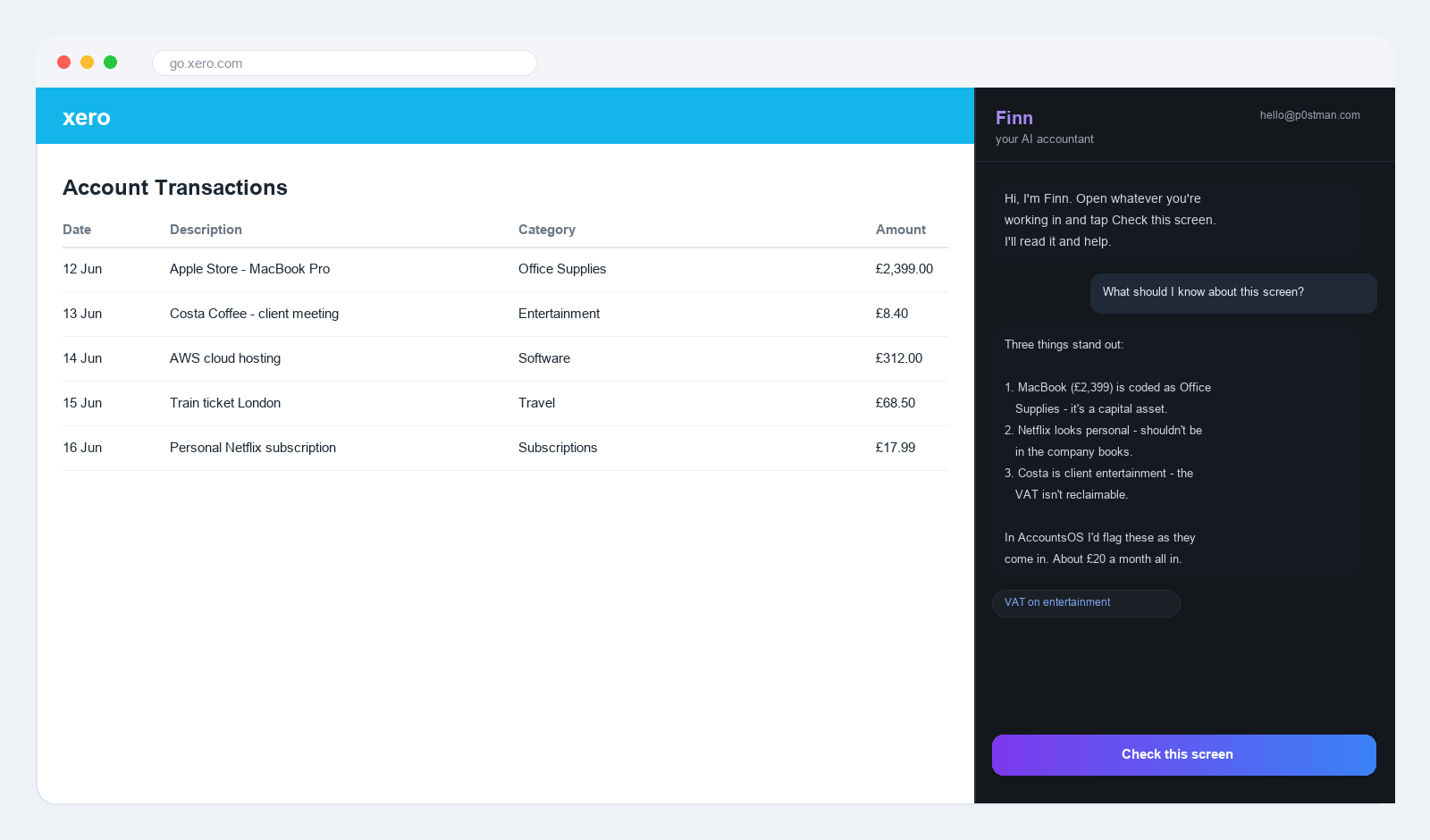
Finn sits in a side panel next to your accounts. Tap Check this screen and it reads what's there, flags what stands out, and shows the sources behind it.
Install in about ten seconds
Finn is on the Chrome Web Store, so it's one click to install. No account needed to try it.
Add to Chrome
Open the Chrome Web Store listing and click Add to Chrome. No account needed, nothing to download or unzip.
Pin Finn to your toolbar
Click the puzzle-piece icon in Chrome's toolbar and pin Finn, so it's one click away wherever you are.
Open the side panel
Click the purple Finn icon to open the side panel next to whatever you're working on.
Check this screen
Open your accounts and tap Check this screen. Finn reads what's there and tells you what stands out. Allow the one-time permission when asked.
How it works
It reads the screen you choose
When you tap Check this screen, Finn takes a snapshot of the current tab and reads it. It never watches in the background and never touches your connected data. It only sees the screenshot you send.
It spots what an accountant would
Miscategorised transactions, VAT codes that look wrong, expenses you could claim, numbers that don't add up. Finn flags them in plain English, with the reasoning.
It answers your questions, with sources
Ask anything, VAT thresholds, what's allowable, a deadline. Finn answers and cites the AccountsOS guides behind it, so you can check the source.
Log in to go unlimited
Try it free for a few questions. Log in with your AccountsOS account to remove the limit. Finn still only reads the screenshot. Your real books stay in AccountsOS.
What you'd use it for
- You're in Xero looking at a £2,000 laptop coded as office supplies, Finn flags it should be a fixed asset.
- You're about to file VAT in QuickBooks, Finn checks the codes look right before you submit.
- A bank statement is open, ask Finn which lines are likely personal and shouldn't be in the books.
- You're staring at an invoice, ask whether the VAT treatment is correct for that client.
- You're researching a tax question, get a cited answer without leaving the page.
Reads only what you show it
Finn never watches your screen in the background and has no access to your bank logins or connected accounting data. It reads a screenshot only when you tap Check this screen, sends it to AccountsOS to be read, and doesn't store it. The extension is read-only, it can never change anything in your accounting software.
Questions
Which accounting tools does it work with?
Any of them. Finn reads a screenshot of whatever's on screen, so it works the same way on Xero, QuickBooks, FreeAgent, Sage, Wave, Zoho, a bank's website, a PDF invoice or a spreadsheet. It doesn't depend on any single tool's layout.
Is it really free?
Yes. The extension is free on the Chrome Web Store and gives you a handful of free questions with no account needed. Log in with an AccountsOS account (14-day free trial, then £20/month + VAT) to remove the limit. Finn in the extension reads screenshots only. For it to work on your actual connected books, that's AccountsOS itself.
How do I install it?
One click from the Chrome Web Store, same as any other extension. Nothing to download, unzip or load in developer mode. Pin Finn to your toolbar afterwards and it's one click away on any page.
Can Finn see my data when I'm not using it?
No. Finn only reads a screenshot when you tap Check this screen, never in the background. It has no access to your bank logins or your connected accounting data. The screenshot is sent to AccountsOS to be read and is not stored.
What permission does it ask for, and why?
The first time you tap Check this screen, Chrome asks permission to read the current tab. That's what lets Finn take the snapshot. It's requested on first use, not at install, and only used when you press the button.
Does it change anything in my accounting software?
Never. The extension is read-only. It looks at the screen and gives advice. It cannot click, edit, file or post anything in Xero, QuickBooks or anywhere else.
Try Finn on your own screen
Add it to Chrome, open it beside your accounts, and see what Finn spots. No account needed to start.