Best MTD Software UK 2026: Free and Paid Options Compared
Several free MTD-compatible software options exist for UK taxpayers, including QuickFile, My Tax Digital, and FreeAgent (free via NatWest or Mettle banking). Paid all-in-one options include Xero, QuickBooks, and Sage. AccountsOS is MTD-compatible software that uses AI to do the bookkeeping for you and submits your VAT return directly to HMRC, from £20 a month plus VAT after a 14-day free trial.
Free MTD options
AccountsOS, QuickFile, My Tax Digital, FreeAgent (via NatWest)
AccountsOS price
£20/month + VAT after a 14-day free trial
Xero starting price
£16/month
QuickBooks starting price
£14/month
HMRC requirement
Software must be on HMRC's recognised list
Digital links
No manual re-keying allowed between systems
Bridging software
Connects spreadsheets to HMRC API
Recommended switch date
January 2026 at the latest
Compliant without the manual work
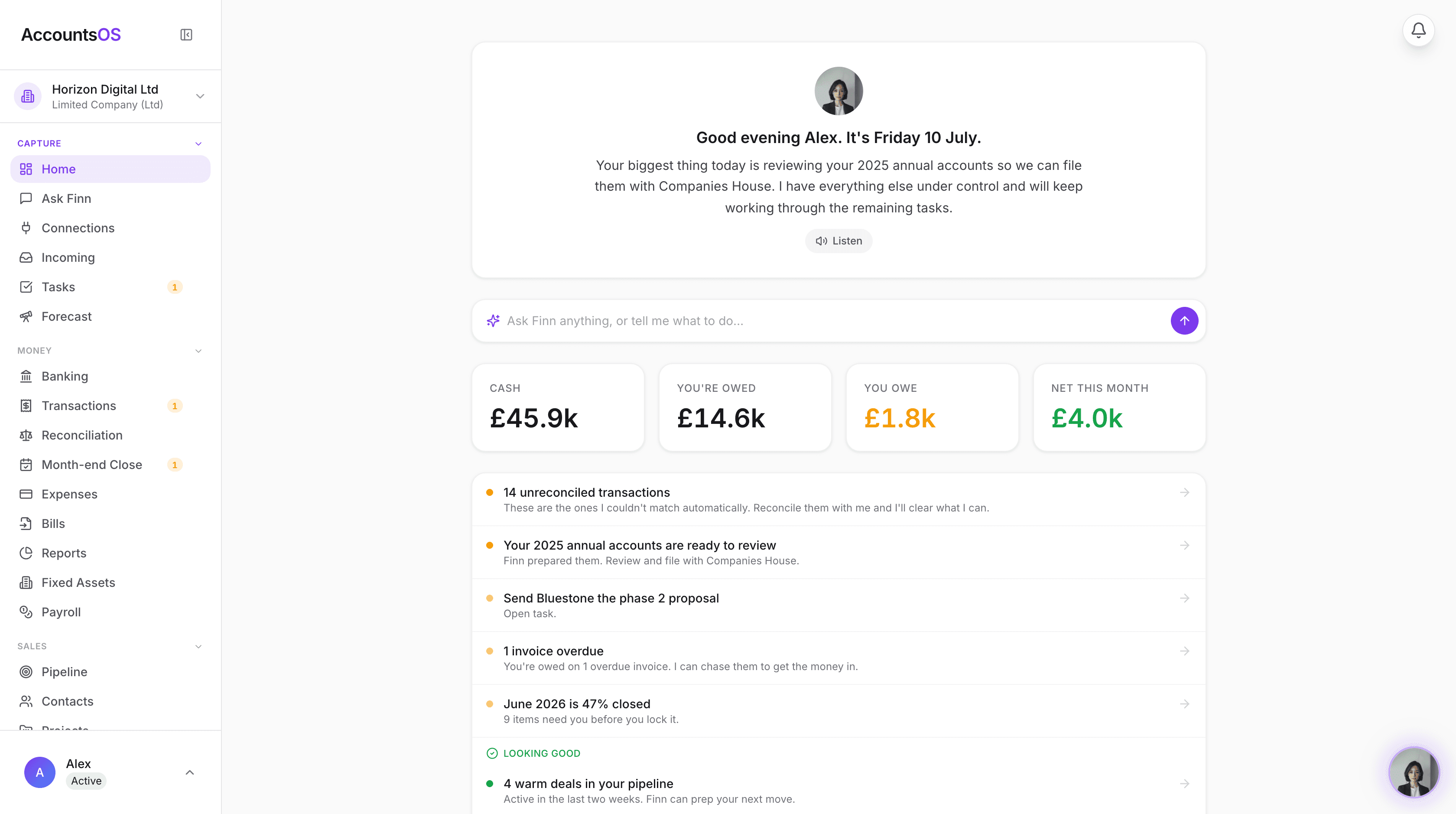
Making Tax Digital means keeping digital records and filing through software. AccountsOS does both for you. Connect your bank and HMRC, and Finn keeps the records, builds the return from your bookkeeping, and files it on your confirmation.
- Digital records kept automatically as money moves
- Returns calculated from your ledger, no bridging spreadsheet
- Submit directly to HMRC once you've checked the figures
- Every deadline tracked so nothing is filed late
Choosing the right MTD-compatible software is one of the most important decisions you will make before April 2026. The software you pick will handle your quarterly submissions to HMRC, store your digital records, and ideally make your bookkeeping easier rather than harder. With dozens of options on the market — from free tools to premium platforms — it can be difficult to know where to start. This guide compares every major option, explains what makes software MTD-compatible, and helps you choose based on your specific situation.
What Makes Software MTD-Compatible?
Not all accounting software is MTD-compatible. To qualify, software must meet three requirements set by HMRC: 1. **Listed on HMRC's recognised software page** — HMRC maintains an official list of software that has been tested and approved for MTD submissions. Using software not on this list means your submissions may not be accepted. 2. **Digital links** — Your records must flow digitally from entry to submission without manual re-keying. This means you cannot type figures from your software into a separate submission tool. The software must connect directly to HMRC's API. 3. **API submission** — The software must be able to submit quarterly updates and Final Declarations directly to HMRC through their Making Tax Digital API. This is a technical requirement that the software provider handles. You do not need to verify these requirements yourself — if the software is on HMRC's list, it meets all three. The key point is that you cannot use generic spreadsheet software (like Excel or Google Sheets) on its own for MTD. You either need full MTD software or a bridging tool that connects your spreadsheet to HMRC.
Free MTD Software Compared
Several genuinely free MTD-compatible options exist. Here is how they compare for the 2026/27 tax year:
| Software | Price | MTD VAT | MTD ITSA Ready | Mobile App | Bank Feeds | Best For |
|---|---|---|---|---|---|---|
| AccountsOS | From £20/mo + VAT | Yes | Yes | Web app | CSV import | AI-powered bookkeeping, chat with your books |
| QuickFile | Free (under 1,000 transactions/year) | Yes | Expected 2026 | No | Yes (Open Banking) | Sole traders who want a simple, no-cost option |
| My Tax Digital | Free | Yes | Expected 2026 | No | No | Basic MTD submission only, no bookkeeping |
| FreeAgent (NatWest/Mettle) | Free with NatWest or Mettle banking | Yes | Yes | Yes | Yes | NatWest/Mettle customers who want full accounting |
| Coconut | Free tier available | Yes | TBC | Yes | Yes | Freelancers who want expense tracking on mobile |
| Clear Books Free | Free for sole traders | Yes | TBC | No | Limited | Simple sole trader accounts |
Paid MTD Software Compared
If you need more features, multiple users, or advanced reporting, paid options offer significantly more capability:
| Software | Price (per month) | MTD VAT | MTD ITSA Ready | Mobile App | Bank Feeds | Best For |
|---|---|---|---|---|---|---|
| Xero Ignite | £16 | Yes | Yes | Yes | Yes | Small businesses wanting professional accounting |
| Xero Grow | £37 | Yes | Yes | Yes | Yes | Businesses with invoicing and bill-paying needs |
| QuickBooks Simple Start | £14 | Yes | Yes | Yes | Yes | Sole traders wanting established software |
| QuickBooks Essentials | £24 | Yes | Yes | Yes | Yes | Businesses needing bill management |
| Sage Accounting Start | £14 | Yes | Yes | Yes | Yes | Traditional businesses preferring Sage |
| FreeAgent (standalone) | £19 | Yes | Yes | Yes | Yes | Freelancers and contractors |
| Ember | From £39 | Yes | TBC | Yes | Yes | Those wanting AI-powered real-time bookkeeping |
| Coconut Pro | £10 | Yes | TBC | Yes | Yes | Mobile-first freelancers |
Why AccountsOS Is Worth Considering
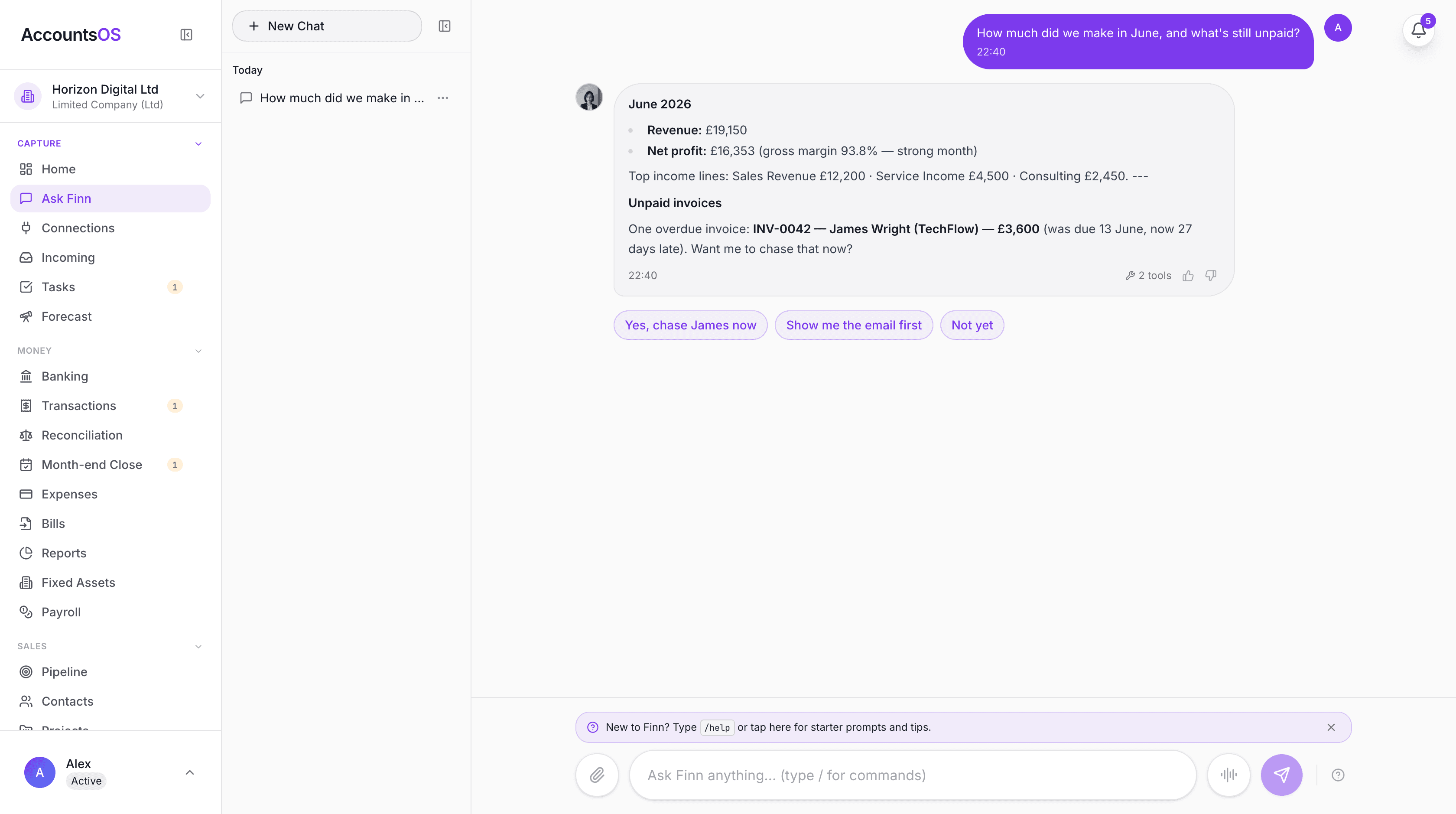
AccountsOS takes a fundamentally different approach to MTD compliance. Rather than giving you another accounting interface to learn, it lets you chat with your books in plain English. Ask "how much did I spend on travel this quarter?" and get an instant answer. Upload a receipt and it gets categorised automatically using AI. When your quarterly deadline approaches, AccountsOS prepares your submission and walks you through confirming the figures — no manual data entry required. Key advantages of AccountsOS for MTD: - **AI-native** — built from the ground up with AI, not bolted on afterwards. The AI understands UK tax rules, HMRC categories, and can explain your figures in plain English. - **AI does the work** — the AI categorises transactions, captures receipts, and builds your return, so you review rather than type. It is £20 a month plus VAT after a 14-day free trial, with no card required to start. - **UK-specific** — designed exclusively for UK taxpayers. Every category, deadline, and rule is HMRC-aligned. - **Voice-first** — talk to your books while driving, walking, or cooking. No screen required. - **HMRC integration** — direct API connection to HMRC for MTD submissions, VAT returns, and deadline tracking. - **Receipt dump** — forward receipts by email or upload them. AI handles categorisation and matching. AccountsOS is not trying to replace Xero or QuickBooks for large businesses with complex needs. It is built for the solo founder, freelancer, or landlord who wants MTD compliance without becoming an accountant.
Bridging Software: For Spreadsheet Users
If you currently use spreadsheets for your bookkeeping and do not want to fully switch to accounting software, bridging software offers a middle ground. Bridging software connects your existing spreadsheet to HMRC's MTD API. You continue keeping your records in Excel or Google Sheets, and the bridging tool extracts the relevant totals and submits them to HMRC. Popular bridging options include: - **BTCSoftware** — established bridging tool used by many accountants - **123 Sheets** — specifically designed for spreadsheet users - **TaxCalc** — offers both full software and bridging functionality The catch: bridging software only handles the submission. It does not help with bookkeeping, categorisation, or record-keeping. You are responsible for ensuring your spreadsheet categories match HMRC's requirements and that your figures are correct. HMRC requires "digital links" throughout the record-keeping process. This means if you copy figures manually from one spreadsheet to another, or from a paper record to a spreadsheet, you may not be compliant. The data must flow digitally from the point of entry to the point of submission. For most people, using proper MTD software (especially a free option) is simpler and safer than trying to maintain compliance through bridging.
How to Choose the Right MTD Software
Your choice depends on three factors: your business type, your budget, and your comfort with technology. **Sole traders with simple income**: Options like QuickFile (free) or AccountsOS (14-day free trial, then £20/month + VAT with AI bookkeeping) are likely sufficient. You do not need advanced features — you need reliable quarterly submissions and basic expense tracking. **Landlords with property income**: Look for software that handles property income categories specifically. AccountsOS and FreeAgent both handle property income well. Xero can handle it with the right chart of accounts setup. **Freelancers and contractors**: FreeAgent has been the go-to for years, especially if your bank offers it free. AccountsOS is a strong alternative if you want AI-powered categorisation — it costs £20/month + VAT after a 14-day free trial. **Multiple income streams**: If you have both self-employment and property income, you need software that can handle both in a single return. Most MTD software supports this, but check before committing. **Already using accounting software**: If you already use Xero, QuickBooks, or Sage, the simplest path is to stay with your current provider and ensure your plan includes MTD for ITSA. Switching software is disruptive and rarely necessary. **Technophobe**: AccountsOS is designed specifically for people who are not comfortable with traditional accounting software. The chat interface means you never need to navigate complex menus or understand double-entry bookkeeping.
Can I Use a Spreadsheet for MTD?
Technically, yes — but only with bridging software. You cannot use a standalone spreadsheet (Excel, Google Sheets) to comply with MTD for ITSA because spreadsheets cannot submit data to HMRC's API. With bridging software, you can maintain your records in a spreadsheet and use the bridging tool to submit quarterly updates. However, you must ensure: - All data flows digitally (no manual re-keying between systems) - Your spreadsheet categories match HMRC's required income and expense categories - You keep the spreadsheet for at least 5 years and 10 months after the tax year For MTD for VAT, HMRC has been strict about digital links since April 2022. The same standard will apply to MTD for ITSA. Spreadsheet users have been caught out by the digital links requirement, so if you go this route, make sure your bridging software provider confirms full compliance. Our honest recommendation: the effort of maintaining a compliant spreadsheet plus bridging software usually exceeds the effort of switching to free, purpose-built MTD software.
How to Switch Software Before April 2026
If you are currently using software that is not MTD-compatible, switch well before April 2026 to give yourself time to set up and learn the new system. Steps to switch: 1. **Export your data** from your current system — most software offers CSV or Excel export of transactions, contacts, and invoices 2. **Choose your new MTD software** — use this guide to compare options 3. **Import your historical data** — most MTD software supports CSV import for bank transactions and contacts 4. **Set up your bank feeds** — connect your bank account for automatic transaction import 5. **Reconcile** — verify that your opening balances match between old and new systems 6. **Run parallel for one month** — if possible, run both systems side by side for a month to catch any discrepancies 7. **Start using the new system exclusively** from the beginning of a new quarter Ideally, switch by January 2026 to give yourself a full quarter of practice before MTD starts in April. Switching in March is technically possible but leaves no margin for error. AccountsOS supports CSV import from all major UK banks (Barclays, Revolut, Starling, Monzo, HSBC, Lloyds) and can import transaction history to get you up and running quickly.
Frequently asked questions
Is there free MTD software available?
Yes. Several genuinely free options exist, including QuickFile (free for smaller businesses), My Tax Digital (free basic submission), and FreeAgent (free if you bank with NatWest, RBS, Ulster or Mettle). Free tools cover the filing but leave you doing the bookkeeping by hand. AccountsOS is not free: it is £20 a month plus VAT after a 14-day free trial, and uses AI to do the record keeping and filing for you.
Does my current accounting software support MTD for Income Tax?
Check HMRC's list of recognised software for MTD for ITSA. Major providers like Xero, QuickBooks, Sage, and FreeAgent have confirmed MTD for ITSA support. Smaller providers may still be working on it — contact them directly to confirm.
Can I use Excel or Google Sheets for MTD?
Not on their own. Spreadsheets cannot submit data to HMRC. However, you can use bridging software alongside your spreadsheet to handle the submission. You must still ensure digital links are maintained throughout your record-keeping process.
What is bridging software?
Bridging software connects your existing spreadsheet or non-MTD system to HMRC's API. It extracts the relevant figures from your records and submits them as quarterly updates. It does not handle bookkeeping — only the submission step.
How much does MTD software typically cost?
Costs range from free to around £15 to £39 a month. Free tools (QuickFile, My Tax Digital, or FreeAgent via certain banks) cover submission but not the bookkeeping. Paid all-in-one tools like Xero, QuickBooks and Sage sit around £12 to £30 a month. AccountsOS is £20 a month plus VAT after a 14-day free trial and includes the AI bookkeeping as well as the HMRC filing.
Can my accountant use MTD software on my behalf?
Yes. Your accountant can use MTD-compatible software to submit quarterly updates and your Final Declaration on your behalf. Many accountants use practice management tools that integrate with HMRC's MTD API. You do not need to use the software yourself if your accountant handles it.
What happens if my software provider goes out of business?
You would need to switch to another MTD-compatible provider. Your records should be exportable from any reputable software. This is why choosing an established provider or one with a clear export function matters. Keep your own backup of transaction data.
Do I need separate software for MTD VAT and MTD Income Tax?
Not necessarily. Most MTD-compatible software handles both VAT and Income Tax submissions. However, check that your specific plan includes both — some providers charge extra for MTD for ITSA on top of MTD for VAT.
Is AccountsOS on HMRC's recognised software list?
AccountsOS is MTD-compatible software built to HMRC's Making Tax Digital VAT specification and files VAT returns directly to HMRC through the official MTD API. HMRC's published software finder on GOV.UK updates periodically, so a newly recognised provider can take time to appear. The reliable check is that AccountsOS authorises through HMRC's own sign-in page and returns a genuine HMRC receipt when you file.
Can I switch MTD software mid-year?
Yes, you can switch software during the tax year. You will need to export your data from the old system and import it into the new one. Ensure that all previously submitted quarterly updates are accounted for in the new system so your Final Declaration is complete.
Related MTD guides
Making Tax Digital for Income Tax: Complete Guide for Sole Traders & Landlords (2026)
MTD for Income Tax Self Assessment requires sole traders and landlords with qualifying income of £50,000 or more to submit quarterly digital updates to HMRC using compatible software from April 2026. Qualifying income is gross self-employment plus UK property income combined, before expenses.
MTD Quarterly Updates: What to Report and When
MTD quarterly updates require you to report your total income and expenses by category to HMRC four times a year. You are NOT sending individual transactions — just category totals. The deadlines are 7 August, 7 November, 7 February, and 7 May.
How to Sign Up for Making Tax Digital for Income Tax
You must sign up for Making Tax Digital for Income Tax through the HMRC online service before 6 April 2026 if your qualifying income exceeds £50,000. You'll need your Government Gateway ID, UTR, NI number, and to have chosen MTD-compatible software before signing up.
Making Tax Digital April 2026: Your Action Plan
Making Tax Digital for Income Tax starts 6 April 2026 for anyone with qualifying income (self-employment + UK property, gross, combined) over £50,000. If this applies to you, you must sign up for MTD, choose compatible software, and start keeping digital records from 6 April 2026.
Get MTD-ready with AccountsOS
Connect your bank and HMRC, and let Finn keep the records, build the return and submit it for you. Be ready for Making Tax Digital without the admin.
Free for 14 days. No credit card required.