For accounting practices
Bring the book. Finn prepares the move.
One client or the client book. Connect Xero or drop exports. Finn maps each file. Your team reviews. Then Finn runs the books and you grow the practice.
30 days free, no card, no monthly minimum. Xero connections are read only and nothing posts without your review.
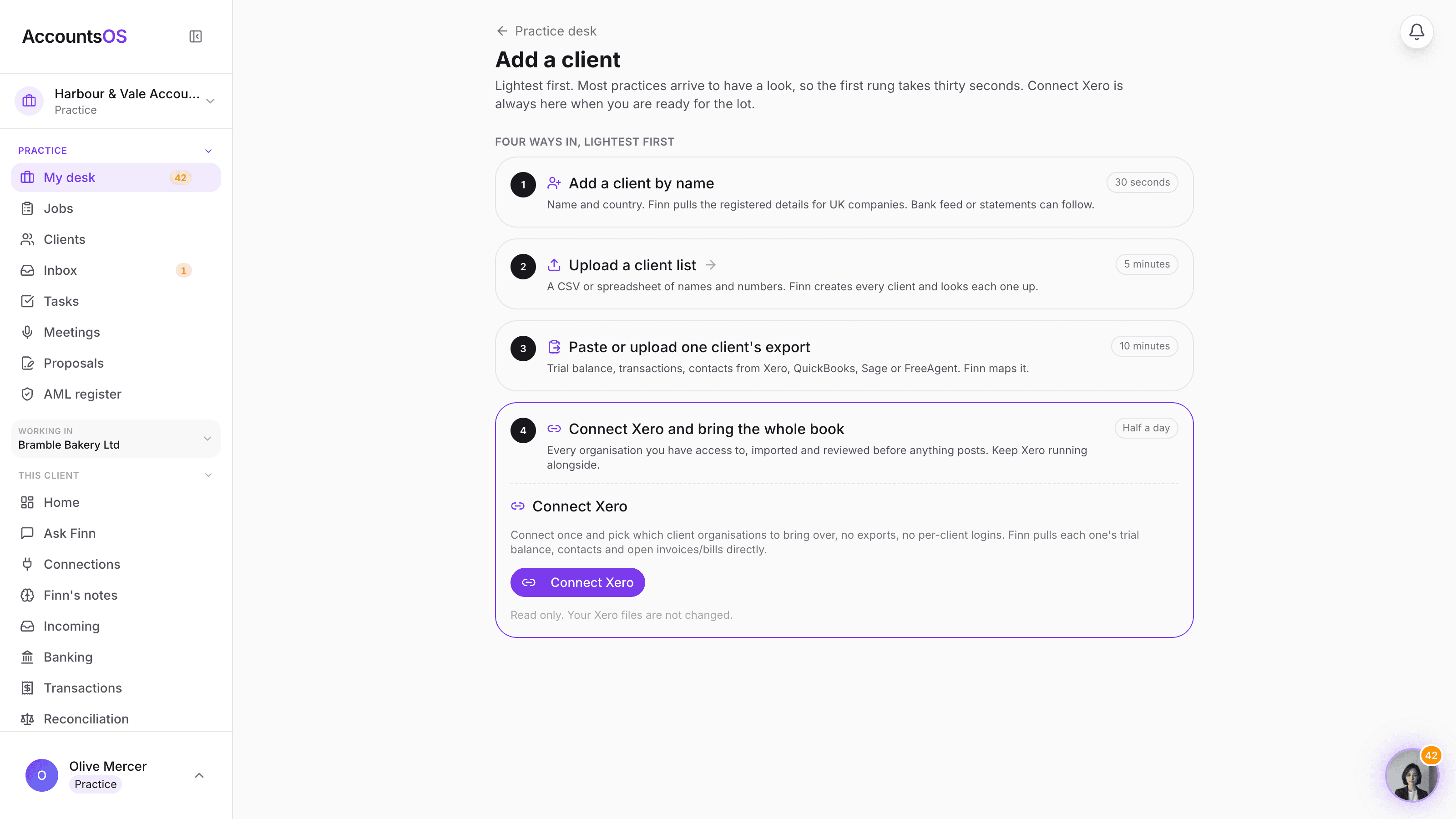
A practice moves clients to AccountsOS four ways: by company name, by uploading a client list, by pasting one client's export from Xero, QuickBooks, Sage or FreeAgent, or by connecting Xero and selecting organisations. Finn prepares an import plan per client and the practice reviews it before anything posts.
AccountsOS · Connect Xero once, pick the clients
Why practices stay put
It was never the software. It was the conversion.
Two hundred client files, each with its own ledger, its own open items, its own quirks. Moving them used to mean staff time you do not have, in a season you cannot pick, with the risk that one client's balances stop agreeing and you find out at the year end.
That was true when a person had to rebuild every file by hand.
What changed
Finn does the conversion work. Your team signs it off.
Finn reads each client's file, maps the chart of accounts, sets the conversion balances, resolves the contacts and lists the unpaid invoices and bills. Then it writes the plan down and waits for a reviewer.
Your team does the part only a practitioner can do: check that the figures agree, then approve. One client at a time, or a batch at a time, in your own order.
The move, start to finish
Land one client. Then roll the book.
No rip-and-replace weekend, no cutover date imposed on the practice. Each client crosses when your reviewer says its figures agree.
01 Open a practice account
Open a practice account.
30 days free, no card, no monthly minimum. Pilot 1 to 10 clients before you commit the book.
02 Four ways in
Four ways in.
Add a client by name and Finn pulls the register. Upload a client list. Paste one client's export. Or connect Xero, read only, and tick the organisations to bring over.
03 Finn prepares, you check
Finn prepares the plan per client.
Chart of accounts, conversion balances, contacts, unpaid invoices and bills. Your team checks the balances and the open items before anything posts.
04 Then the next batch
Run one real period, then bring the next batch.
A Xero connection takes up to 10 organisations a batch, so keep running batches until the book is across. Client lists and exports go wider.
Four ways in, lightest first
The clients you bring over land on the practice desk with their scope and allocation already set, alongside every client already on the book.
AccountsOS · Four ways in, lightest first
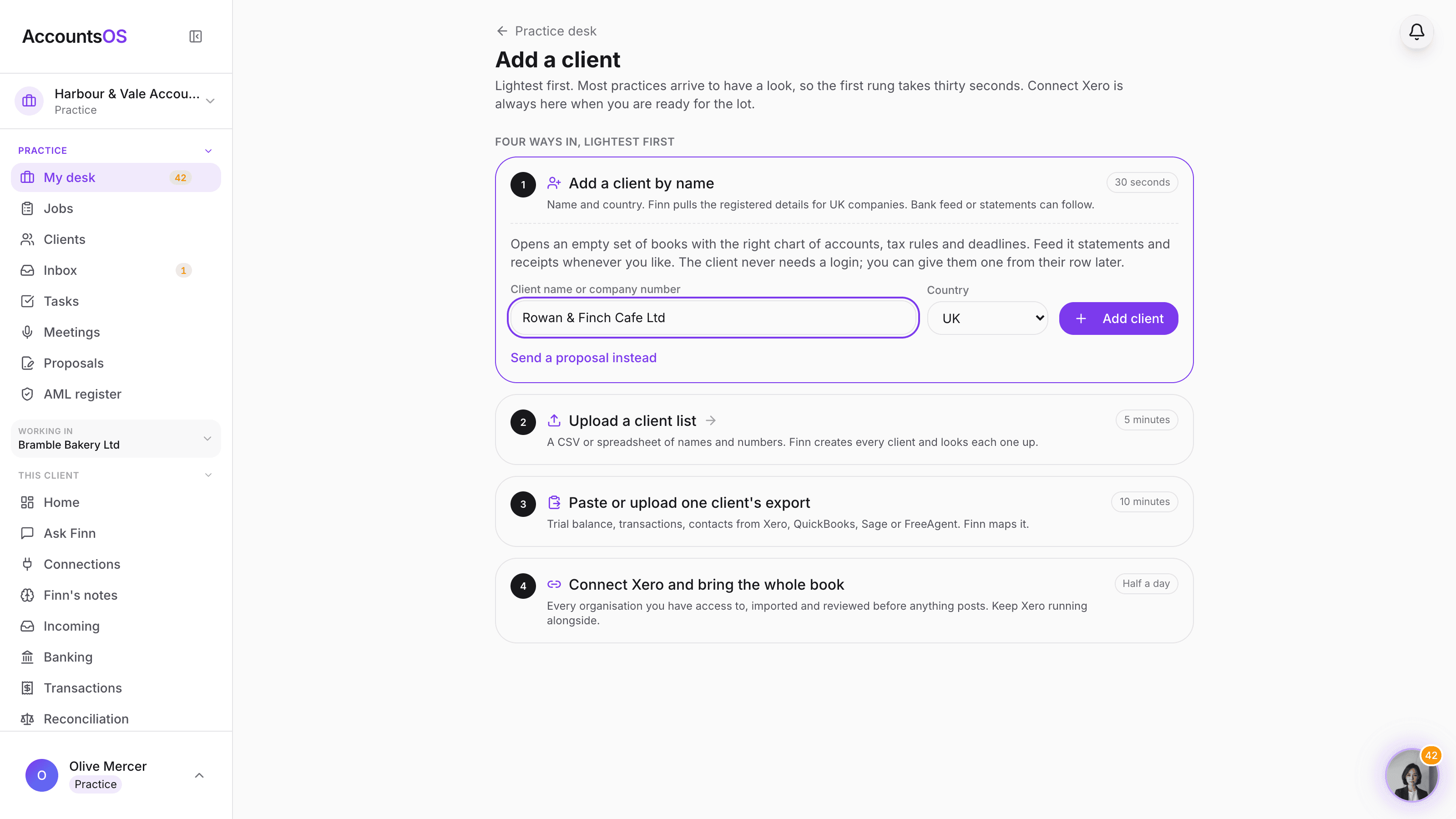
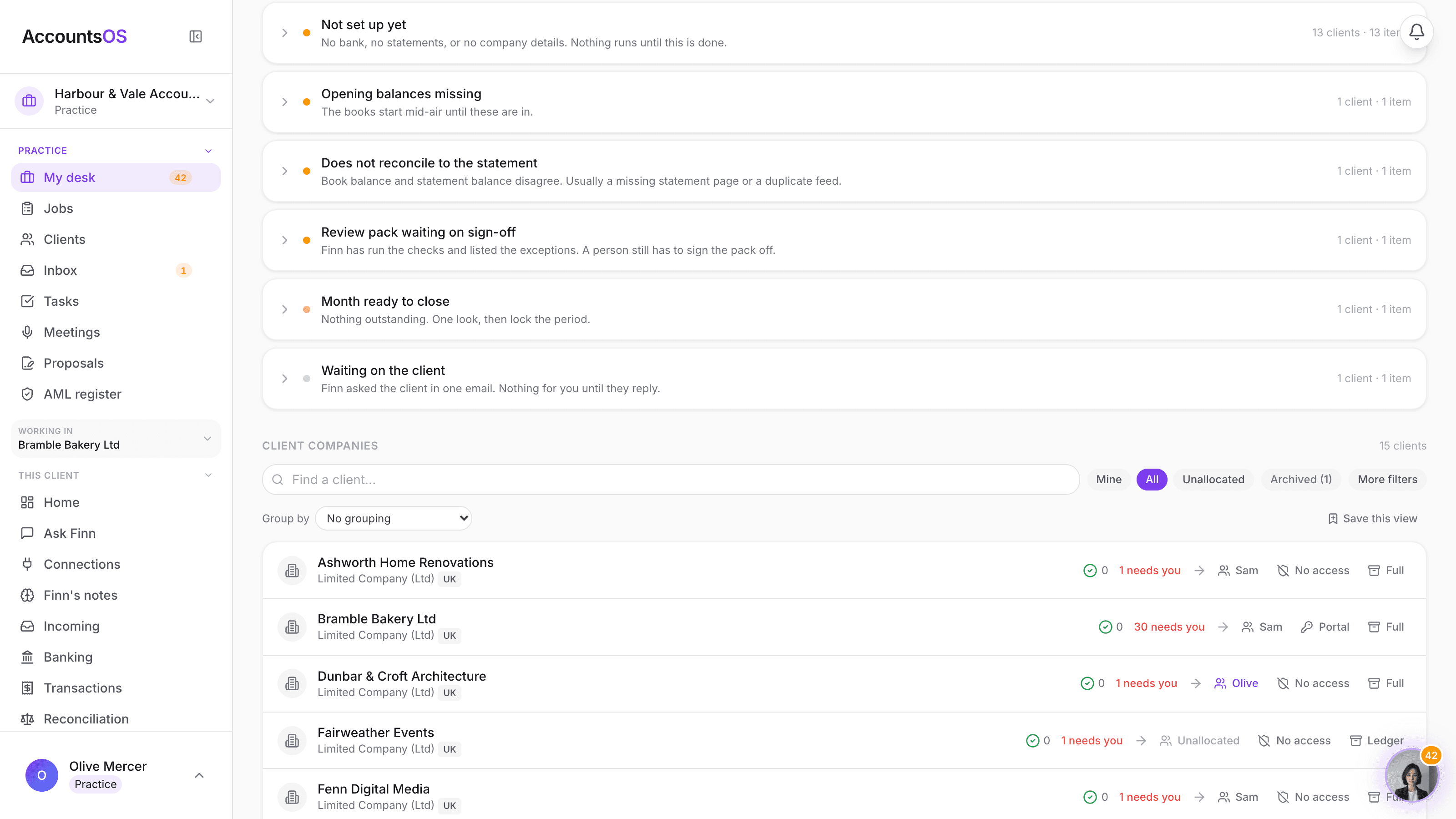
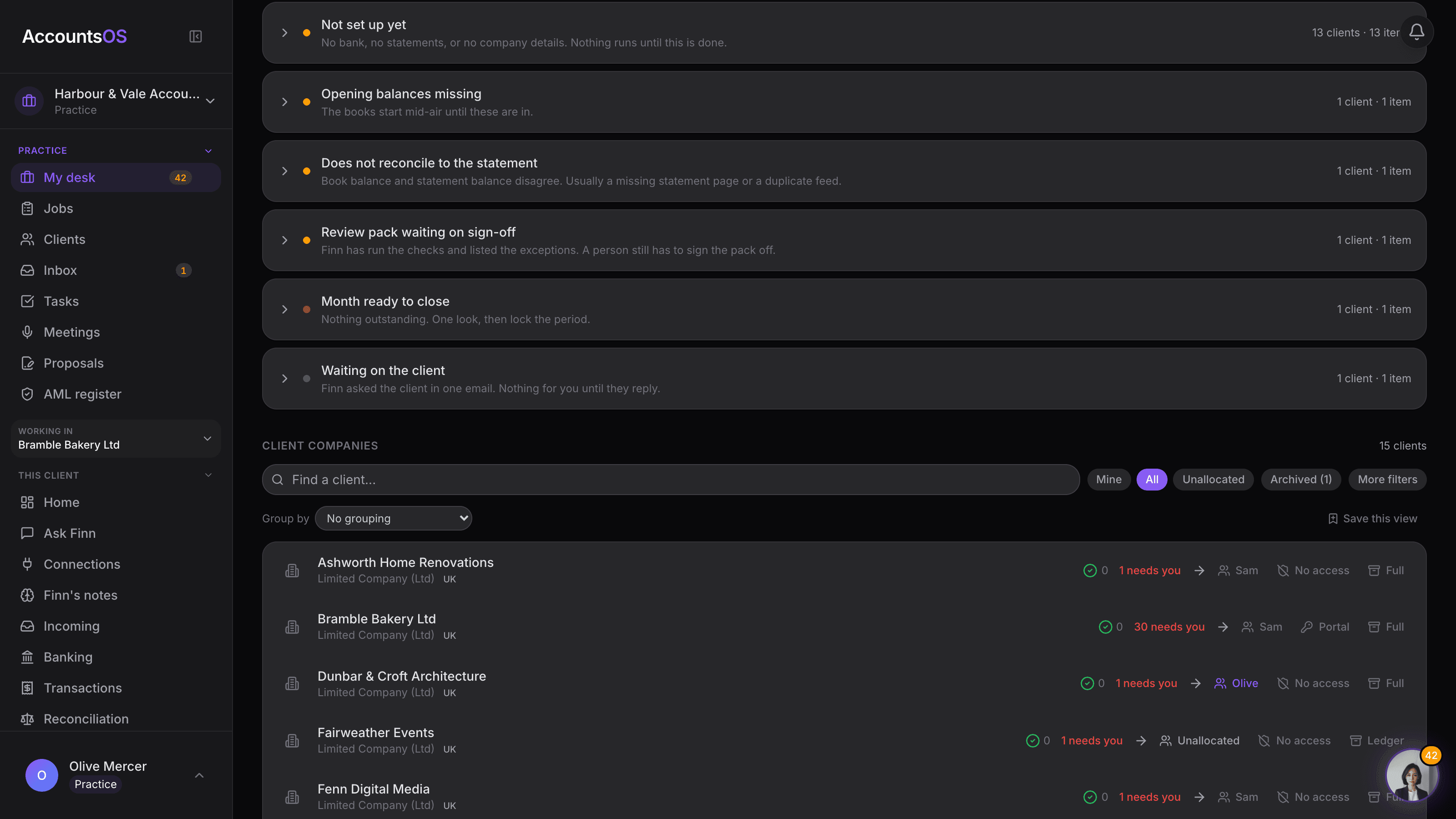
Four ways in, lightest first
Add one client by name in thirty seconds, upload a client list, paste one client's export, or connect Xero and bring the whole book. One client or the lot, whichever suits you.
Screenshots use a demo practice. Use your pilot to verify your own results.
From a pilot to the whole book
Ten clients, then a few dozen, then hundreds.
Batches, not one big bang. That is deliberate: each batch gets reviewed, so the book crosses at the pace your team can check it.
What comes across, and what you bring.
Agree this per client before the conversion date, and nothing surprises the reviewer.
Comes across from the connection or the export
- The chart of accounts, mapped per client and shown to you before it posts.
- The trial balance at the conversion date you set for that client.
- Contacts, with Finn's proposed merges for the obvious duplicates.
- Authorised unpaid sales invoices and bills, so open AR and AP survive the move.
- Transaction history where you supply an export, including historical VAT.
The practice brings
- Bank feeds, connected fresh in AccountsOS. Feed connections are never copied from the old system.
- Receipts and source documents, dropped in or forwarded per client. Finn reads them and matches them.
- Prior-year accounts and filed returns you want on file, uploaded as exports, trial balances or packs.
What protects the pilot
Nothing your team has not signed off.
The source is read only
A Xero connection reads. Nothing in your clients' Xero files is changed or removed, so the pilot carries no risk to the records you are relying on.
Review before it posts
Finn prepares the import plan and stops. Your team compares the trial balance at the same date in both systems and checks the open items before applying it.
Keep the old system through the pilot
Decide where live work is recorded during the changeover so the two sets of books do not drift, then retire the old login once the figures agree.
No double counting
Conversion balances and open items are reconciled against each other, so an unpaid invoice does not land twice: once in the opening position and once as a live document.
Client books are held in the EU, on our own servers in Helsinki, and are never used to train AI models. For UK VAT, AccountsOS is HMRC-recognised software for Making Tax Digital for VAT: Finn prepares the return, your team reviews, files and signs. On HMRC's list of MTD VAT software (opens gov.uk in a new tab). The platform covers 32 countries, separate from that listing.
Questions practices ask first
Can I pilot with one client?
Yes, and it is the way we recommend starting. Open a practice account, bring one client across by name, export or Xero connection, review the import plan and run a real period. There is no practice monthly minimum, so a one-client pilot costs one client.
How many clients can I bring at once?
A Xero connection currently accepts up to 10 organisations per batch, so a larger book moves as a series of batches rather than one pull. Uploading a client list or pasting exports goes wider per run. For books of 200 to 500 clients and up we plan the batch order with you.
Do my clients need a login?
No. Your team can run the books entirely internally. You can give a client their own access later from their row if it helps your service, and the access table shows exactly who can open which books.
Do I have to leave Xero to try this?
No. The connection is read only, so your clients' Xero files are untouched and you can keep the subscription running through the pilot. Agree with your team where live work is recorded during the changeover, then retire the old login when the figures agree.
What about receipts and historical years?
Plan those separately. The connection does not carry receipt attachments, filed VAT returns, payroll history or bank-feed connections. Receipts come in by upload, email forwarding or the client's own channel, and Finn reads and matches them. Prior years come as exports, trial balances or uploaded packs.
Will you help with a large book?
Yes. Tell us about the book and we will plan the batches, the conversion dates and the review split with your team. Custom integrations and hands-on setup are available where a practice needs them, and your team stays the reviewer and the signer throughout.
Tell us about your book
You do not need us to start: open a practice account and bring a client across today. If the book is large or unusual, tell us how many clients you run and what you use now, and we will plan the batches with you.
The book is not trapped.
Open a practice account, bring one client across, and see the plan before a single line posts. No minimum, no cutover weekend.
Questions? Email finn@accounts-os.com